Renovation projects rarely fail because of bad design intent. They fail because the initial input is inappropriate.
Outdated as-built drawings. Missing ceiling data. Structural changes that never made it back into records. Most renovation teams begin with documents that were already compromised before design even started. The result is predictable. RFIs pile up, coordination meetings drag on, and construction teams discover conflicts only after materials arrive on site.
Traditional documentation methods struggle in existing buildings because the building itself has changed over time. Walls shift, services get rerouted, and temporary fixes become permanent. Manual surveys and legacy drawings can’t keep up with that reality. And when decisions are based on assumptions, risk creeps into every phase of the project.
This is where scan to BIM services change the starting point.
Point cloud scan to BIM provides a reliable digital record of existing conditions. Instead of designing around uncertainty, teams work from measured geometry that reflects what’s actually built.
In this article, you’ll see how Scan to BIM fits into real renovation workflows, where accuracy actually matters, and how teams use it to reduce rework, control costs, and keep schedules intact. Not theory. Practical insight drawn from renovation projects where the margin for error was thin.
Challenges of Traditional Renovation Documentation
Paper drawings, outdated blueprints, and dimensions measured with tape present familiar challenges.
Hand-measured surveys miss hidden elements. Subsurface MEP runs in ceilings, and chases are often wrong on as-built drawings. That error shows up later, during shop drawing review or installation, and costs real money. We have seen projects derail because MEP clashes weren’t caught until field install.
Common failure modes
- Existing drawings differ from field reality.
- Coordination delays because teams wait for clarification.
- Rework during fit-out when field conditions contradict documents.
These problems increase risk and drive schedule. According to McKinsey’s 2024 analysis , construction costs are projected to rise materially from $13 trillion in 2023 to a striking $22 trillion in 2040 globally, adding pressure to control rework and schedule risk.
What Is Scan to BIM and How It Works
Scan to BIM is not a visualization exercise. It is a controlled translation of measured reality into structured building data that teams can design, coordinate, and build from.
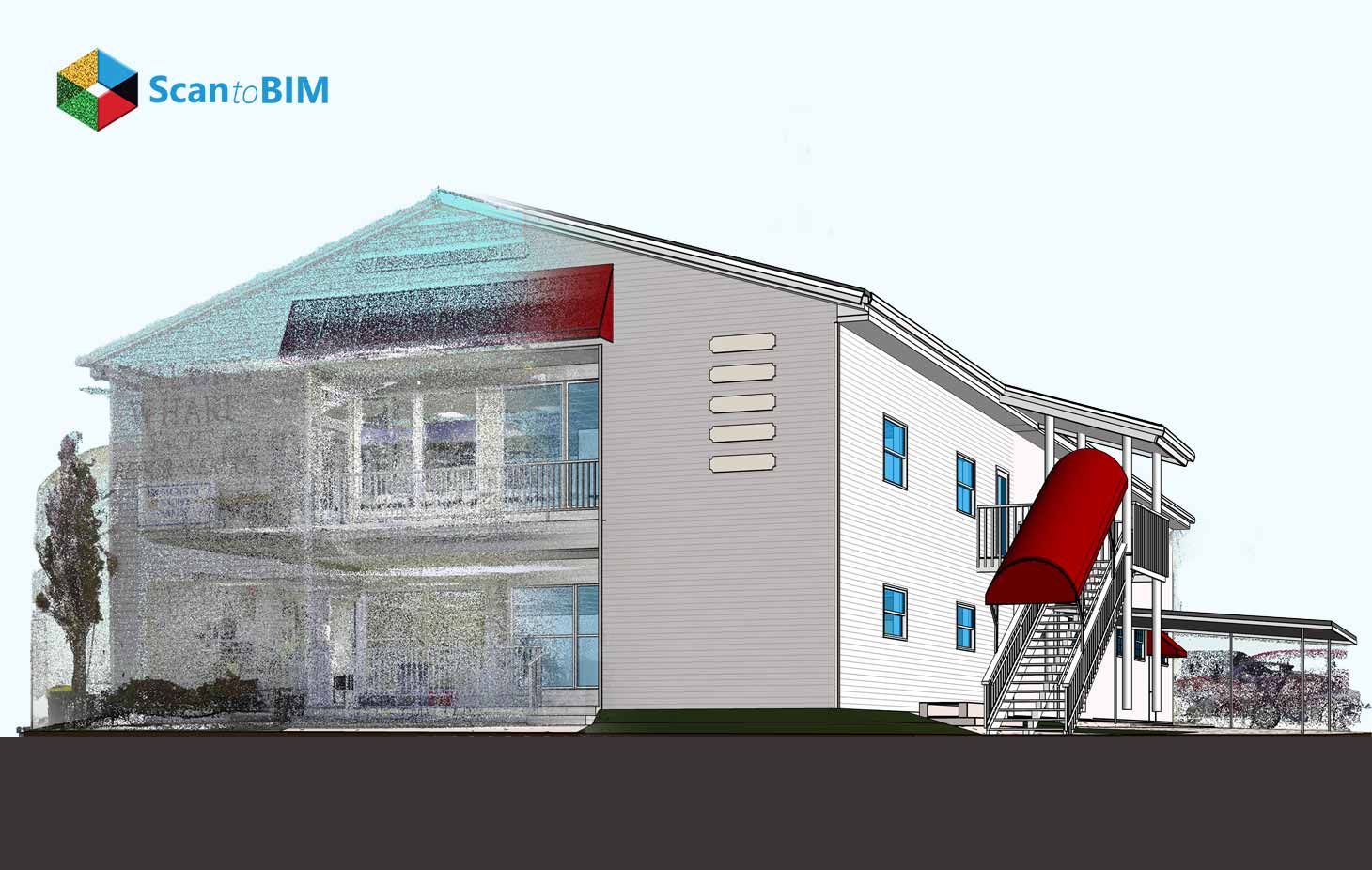
Scan to BIM for renovation projects starts with scanning existing conditions using LiDAR laser scanners or photogrammetry. Laser scanning captures millions of data points that describe the true geometry of a building, including deviations, misalignments, and legacy conditions that rarely appear in drawings. The output is a registered point cloud, referenced to a known coordinate system and ready for modeling.
But the point cloud itself is not the deliverable. It’s raw data.
The Scan to BIM Process begins when that point cloud is interpreted and converted into BIM elements. Walls are not just traced; they are assigned thickness, type, and location based on measured offsets. Structural elements are modeled where they exist, not where they were intended to exist. MEP systems are reconstructed with actual slopes, clearances, and intersections intact.
This distinction matters in renovation work. Existing buildings often contain layered construction history, systems overlap, floors are rarely level, and columns drift over multiple stories. Scan to BIM preserves those conditions so design teams can respond to them instead of discovering them during installation.
Another key technical aspect is tolerance control. Scan to BIM models are not expected to match every point. They are modeled within defined tolerances tied to the project’s BIM uses, whether that’s coordination, prefabrication, or construction planning. This keeps models accurate without becoming unmanageable.
Therefore, Scan to BIM services replace assumption-based documentation with measured, decision-ready models. For renovation projects where existing conditions drive risk, that shift changes how teams plan, coordinate, and build.
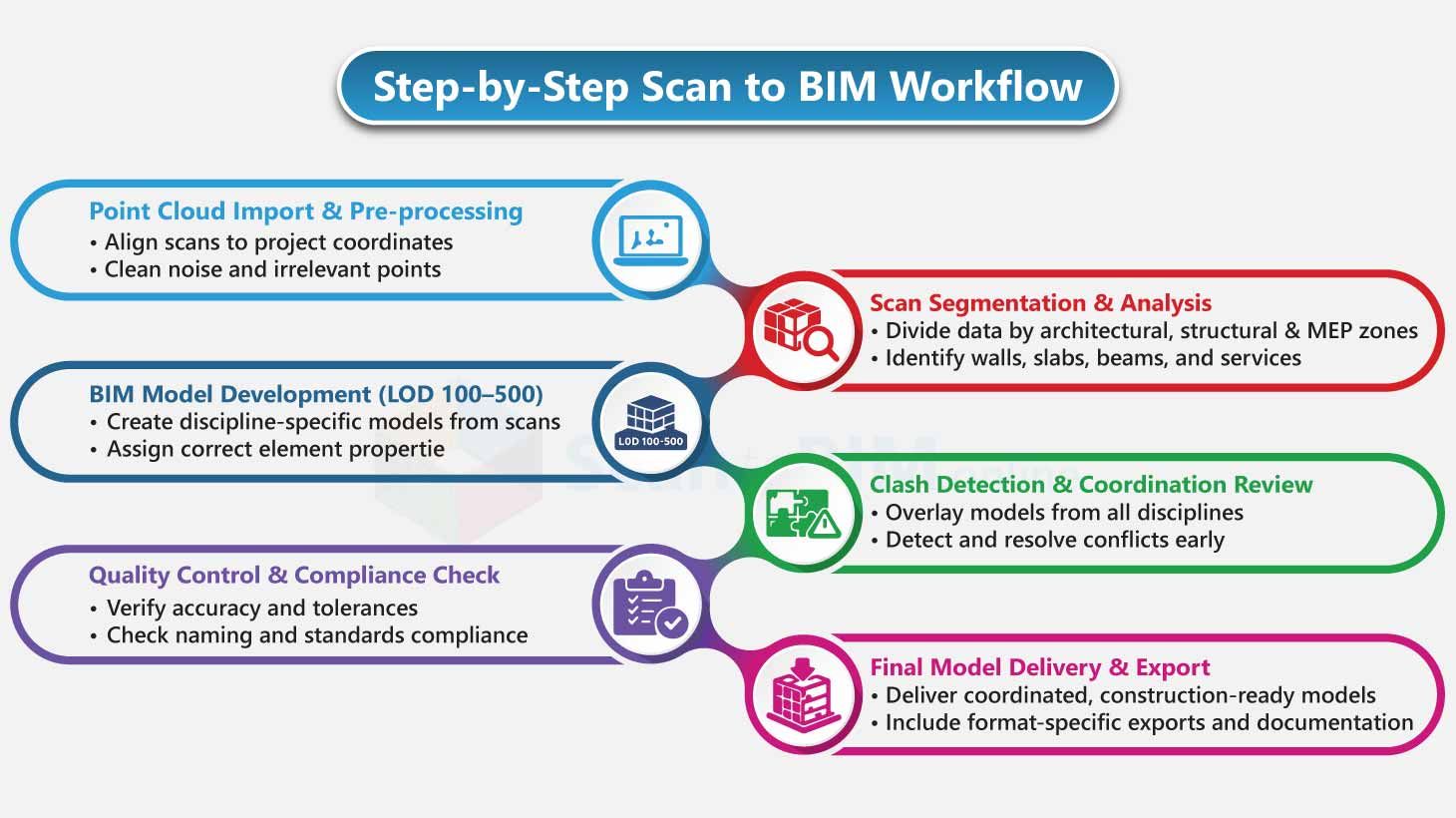
Scan to BIM Workflow for Renovation Projects
Once the scan data is in hand, the renovation project either gains momentum or quietly picks up risk. This phase matters more than most teams expect. Scan to BIM process is not about tracing points. It’s about deciding what reality to trust and how to represent it without introducing new assumptions.
Step 1: Validate the Point Cloud Before Modeling
The first task is not modeling. It’s verification.
The point cloud is reviewed for:
- Completeness across all renovation zones
- Registration consistency between floors and wings
- Alignment to agreed reference points such as grids or control lines
This step often surfaces conditions teams weren’t expecting. Slight floor slopes, columns that drift, and walls that don’t line up between levels. None of these are problems. But ignoring them is.
If the cloud isn’t validated here, those issues show up later as coordination conflicts, usually during construction. That’s the expensive moment.
Step 2: Lock the Modeling Rules Early
Before geometry is created, modeling rules are defined and frozen.
This includes:
- Project coordinates and shared reference setup
- Modeling tolerances tied to renovation risk
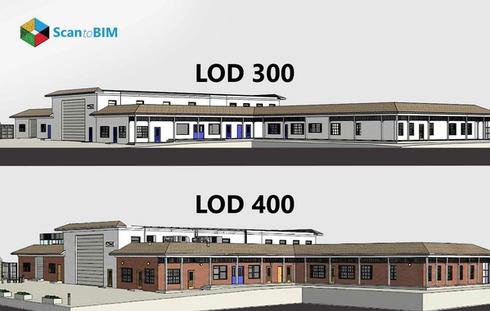
- Clear LOD (Level of Development) expectations for each discipline
Renovation projects don’t benefit from uniform detail everywhere. Areas affected by new structure or dense MEP need higher accuracy. Areas left untouched don’t.
This selective approach keeps models usable instead of bloated. It also avoids wasting effort on elements that won’t affect construction decisions.
Step 3: Model Directly From the Point Cloud
Modeling begins against the point cloud itself. Existing drawings stay secondary.
Architectural elements establish the baseline. Structural elements follow where loads or modifications are involved. MEP systems are modeled based on what physically exists, not what was supposed to exist.
This is where Scan to BIM earns its place in renovation work. Existing buildings rarely match documentation. Modeling directly from measured data exposes real offsets, clashes, and clearance issues early.
And yes, this can be uncomfortable during design reviews. But it’s far better than discovering these conditions on site.
Step 4: Continuous Checks, Not Final Fixes
Quality control isn’t saved for the end.
As modeling progresses, geometry is continuously checked against the point cloud using sections, elevations, and focused reviews in high-risk areas:
- Shafts and risers
- Congested ceiling zones
- Structural intersections
Deviations are flagged, not hidden. Design teams can then decide what needs correction, what can be accepted, and what affects downstream trades.
This keeps coordination discussions grounded in measured reality rather than opinion.
Step 5: Package the Model for Renovation Use
The final step in the Scan to BIM workflow isn’t exporting files. It’s preparing the model for how it will actually be used.
That means:
- Clean, discipline-specific views for coordination
- Clear naming and element classification
- Documented tolerances and known limitations
Renovation teams don’t have time to interpret messy models. They need clarity fast.
A well-structured Scan to BIM model becomes a working reference throughout design, coordination, and construction. A poorly packaged one becomes another source of friction.
Scan to BIM accuracy benefits when the workflow respects reality, controls assumptions, and prioritizes decision-making over visual perfection. That’s what keeps renovation risk manageable.
Role of Laser Scanning in Existing Conditions Capture
In renovation projects, laser scanning captures what’s actually there. Not what the drawings say. Not what someone remembers from the last remodel.
Manual surveys and legacy documents struggle with existing buildings because actual site conditions change over time. Laser scanning removes that guesswork by recording dense spatial data across all visible surfaces. Walls, slab edges, beam soffits, and exposed services. Everything becomes measurable, not inferred.
That level of detail matters when renovation decisions depend on tight clearances and system alignment.
In practice, laser scanning for renovations helps by:
- Revealing geometric deviations like wall bowing, floor slope, and column drift
- Preserving how architectural, structural, and MEP systems relate to each other in space
- Capturing congested ceiling zones that are nearly impossible to document manually
- Establishing a single spatial reference for all disciplines to work from
Consistency is the real advantage. One data set. One reference. Fewer conflicting interpretations.
For renovation projects, laser scanning isn’t about speed or visuals. It’s about completeness. And when existing conditions drive risk, completeness is what teams rely on.
Accuracy Advantages of Scan to BIM Models
Accuracy in Scan to BIM isn’t about chasing perfect geometry. It’s about removing doubt from decisions that already carry enough risk in renovation projects. When models are built from verified point cloud data, teams stop guessing and start working with what’s actually in the building.
That accuracy shows up in very practical ways:
- Reliable Positioning: Walls, slabs, and columns are modeled where they exist, including subtle offsets that affect fit-out and sequencing.
- Real Clearance Checks: MEP routing is tested against actual space, not assumed dimensions from old drawings.
- Clear Tolerance Boundaries: Defined modeling tolerances help teams decide what needs redesign and what can stay as-is.
- Fewer Interpretation Gaps: Everyone works from the same measured reference instead of reconciling conflicting documents.
When model accuracy is consistent and understood, coordination reviews move faster and stay focused. Conversations shift from “is this correct?” to “how do we solve this?”
Accurate Scan to BIM models don’t prevent challenges. They expose them early, when adjustments are still affordable.
Reducing Rework and Design Conflicts in Renovations
Rework in renovation projects isn’t a minor inconvenience. It’s a budget and schedule risk that quietly compounds when design assumptions collide with real site conditions. A study by BECHT says that between 2% and 20% of total project costs are lost to rework, and renovations tend to sit at the higher end of that range because so much is hidden until walls and ceilings are opened.
Scan to BIM Services reduces that exposure by grounding design decisions in measured reality, not outdated drawings.
Here’s how it makes a difference:
- Early Clash Detection: Precise as-built models show conflicts between the new design elements and the existing conditions during coordination, instead of installation.
- Reference Shared Among Disciplines: Architects, engineers, and contractors are working collectively on the same validated model, which thus limits misconceptions and RFIs.
- Reduced Number of Late Design Changes: The designers modify layouts considering real geometry at an early stage when changes are still affordable.
- Updated Shop Drawings: The fabrication is carried out according to the actual dimensions and not field assumptions.
In renovation work, fewer surprises mean fewer stop-works. Scan to BIM shifts clash resolution upstream, where it belongs.
Scan to BIM Benefits for Architects, Engineers, and Contractors
| Stakeholders | Where Renovation Projects Usually Break | How Scan to BIM Helps in Practice |
|---|---|---|
| Architects | Designing around unreliable as-built drawings leads to late layout changes and compromised design intent | Accurate existing-condition models allow architects to design within real constraints, validate clearances early, and avoid redesign during permit or construction phases |
| Structural Engineers | Unknown offsets, undocumented modifications, and slab irregularities affect load paths and retrofit detailing | Scan-based models expose true geometry, helping engineers assess structural feasibility, reinforce accurately, and avoid conservative overdesign |
| MEP Engineers | Congested ceiling zones and unknown service routes cause coordination failures and last-minute rerouting | Modeling from point clouds reveals actual service locations, slopes, and intersections, enabling realistic routing and clash-free coordination |
| Contractors | Field discoveries lead to RFIs, change orders, and schedule disruption | Scan to BIM provides constructible models that support sequencing, coordination reviews, and prefabrication with fewer site surprises |
| Fabricators | Shop drawings based on assumptions result in rework during installation | Accurate models tied to existing conditions improve fabrication fit and reduce corrective work on site |
| Owners / Facility Teams | Poor documentation limits future renovations and facility planning | As-built BIM models create a reliable digital record that supports long-term operations and future upgrades |
Use Cases of Scan to BIM in Renovation and Retrofit Projects
Scan to BIM proves its value in renovation work where existing conditions quietly dictate what’s possible. These projects don’t fail because of design intent. They fail when reality shows up late.
Some of the most practical use cases include:
- MEP Upgradesin Occupied Buildings: Accurate ceiling and MEP BIM service models help teams plan reroutes without shutting down operations or opening unnecessary areas.
- Structural Retrofitsand Reinforcements: Scan-based models reveal actual locations of elements and slab conditions, reducing misconception and rework.
- Interior Renovationsand Space Reconfiguration: Designers validate wall alignments, clearances, and accessibility against real geometry before layouts are finalized.
- Heritage Preservation: Complex, irregular forms are captured without invasive surveys, preserving details that manual methods often miss.
- Energyand System Modernization Projects: Existing mechanical and electrical layouts are documented clearly, allowing upgrades with controlled demolition.
In renovation and retrofit projects, Point Cloud Scan to BIM isn’t about doing more. It’s about knowing more before construction forces the issue.
Improving Project Timelines and Cost Control with Scan to BIM
Renovation projects don’t usually fall behind because of one big mistake. They lose time and money through small, avoidable disruptions caused by unknown site conditions. Scan to BIM helps teams regain control by grounding decisions in what actually exists.
Here’s how it improves timelines and cost management:
- Earlier Issue Resolution: Conflicts with structure, services, or clearances are identified during modeling, not during construction.
- Faster Coordination Reviews: Teams spend less time debating assumptions and more time resolving real constraints.
- Reduced Design Churn: Designs are developed against verified geometry, lowering the need for late revisions.
- More Reliable QuantityTakeoffs: The measured conditions not only enhance material planning, but they also lessen the need for over-ordering.
- Fewer Site Delays: The contractors know sequencing very well and thus, make the least stop-work and rework cycles.
Scan to BIM speeds up renovations by removing uncertainty. When teams know what they’re working with, schedules stabilize, costs stay predictable, and renovation projects move forward with far fewer.
Conclusion: Why Scan to BIM Is Essential for Renovation Success
If you manage renovation budgets, you should care about risk and schedule. The scan to BIM process replaces uncertainty with a verifiable source of truth. Like any other tech process, there are trade-offs in cost and turnaround with point cloud scan to BIM. But, if done properly with the respective tolerances and quality assurance, it reduces the most significant factor leading to retrofitting rework, which wrong assumptions about the existing building.
Three quick takeaways you can implement right away:
- Align Scan to BIM scope with renovation objectives at the beginning, so that the models can support not only documentation but also coordination and construction decisions.
- Base modeling on verified scan data with clear accuracy and tolerance requirements to avoid downstream assumptions.
- Use a single, controlled model reference to keep all trades working from the same factual information.
Ready to turn real-world conditions into reliable renovation models that reduce risk, rework, and design conflicts?