Buildings hold decades of history. Walls shift, ducts get rerouted, equipment gets swapped, and drawings disappear. The physical structure keeps changing. The paperwork rarely catches up. That gap between paper records and physical reality drives real cost. Renovation planning suffers. Maintenance scheduling slows down. Converting a static structure into an intelligent digital model closes the gap directly. The shift from physical spaces to living digital records shapes every phase of the building lifecycle, from acquisition through eventual disposal.
Introduction to Point Cloud to BIM for Existing Buildings
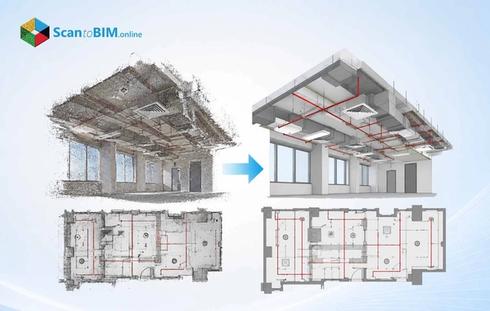
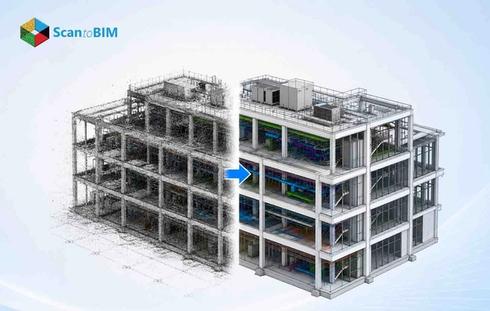
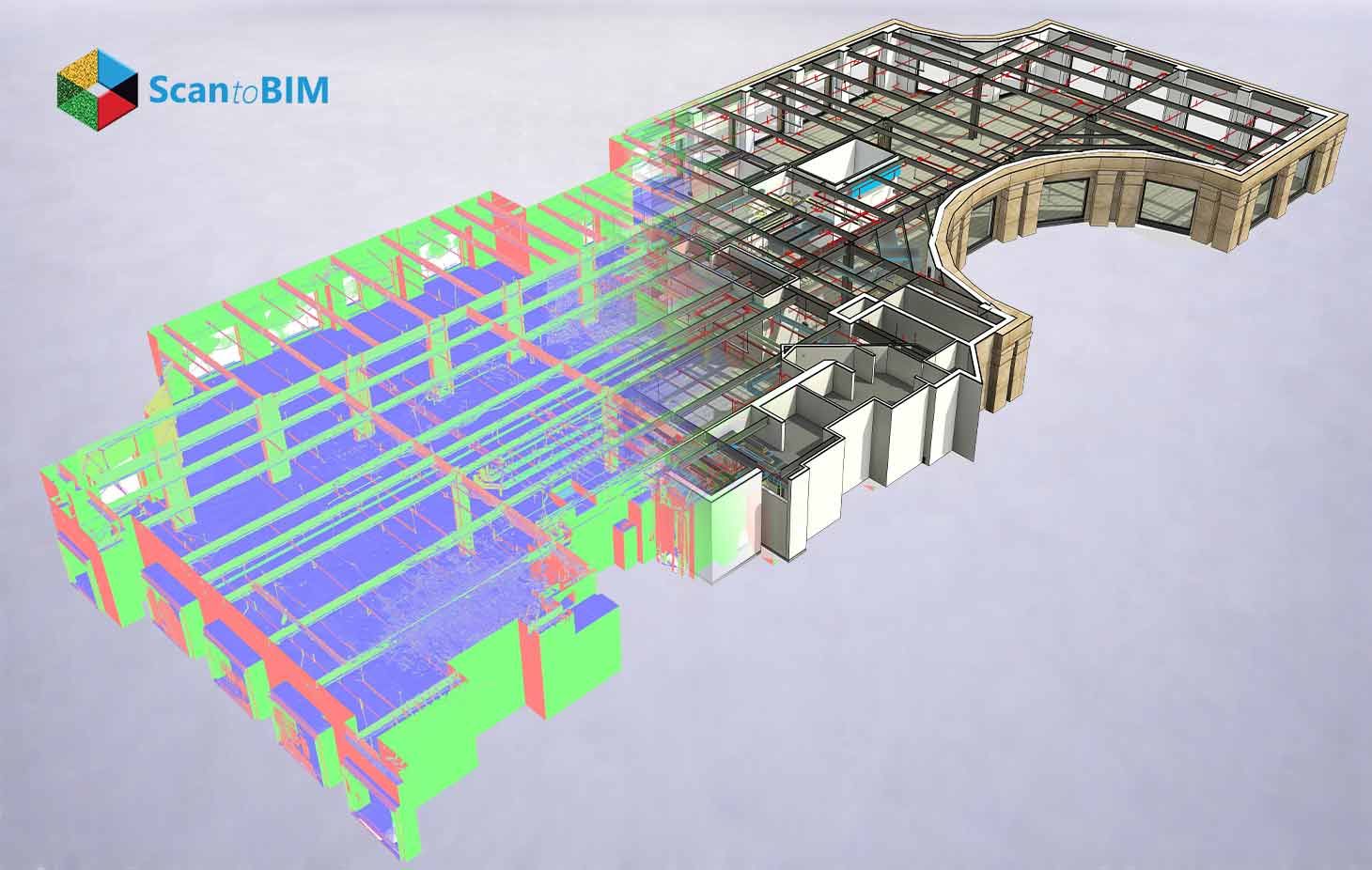
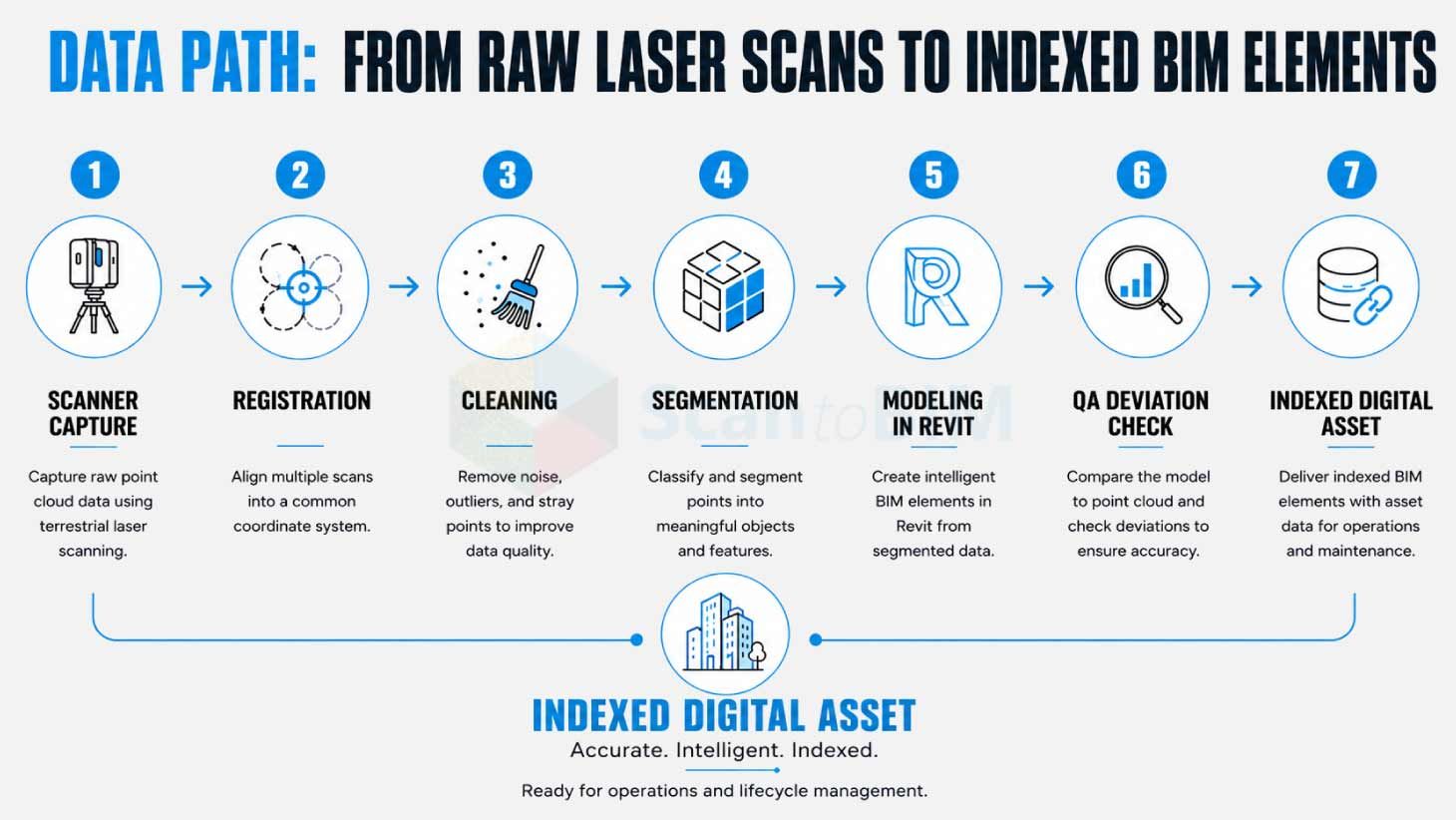
Point Cloud to BIM converts millions of laser-captured spatial points into structured parametric components. The workflow opens with 3D laser scanning or LiDAR capture. The scanner sweeps walls, floors, ceilings, ducts, and structural members. Raw output lands inside Autodesk ReCap for the first cleanup pass. Leica Cyclone, CloudCompare, or FARO Scenes cover the same job for teams running other gear. Modelers then move the cleaned cloud into Autodesk Revit and build intelligent geometry around it.
The workflow matters because older buildings often carry outdated drawings or missing documentation entirely. Field measurements done by hand introduce errors at every step. Heritage structures often resist invasive surveying methods. A scan captures the real geometry within hours, and the resulting model becomes a working digital twin of the physical asset. Architects, engineers, contractors, and facility managers gain a shared source of verified data for every decision that follows.
Why Existing Buildings Need Accurate Digital Documentation
Older buildings hide things. The project involved undocumented modifications, rerouted utilities, settled foundations, and modified load paths. Renovation crews stumble onto these surprises on-site. Often too late. Change orders pile up. Schedules slip. The design team takes another pass at work that everyone thought was finished.
Manual surveying takes weeks for medium-sized buildings. The output remains 2D, error-prone, and difficult to share. Complex geometries such as curved façades, vaulted ceilings, or industrial pipe racks resist tape measure documentation entirely.
Verified digital records hand every stakeholder a clear picture of actual conditions before design starts. Heritage work gains a second advantage here. The scan records fragile structures from a distance, with zero physical contact. The model also functions as a long-term asset record, holding geometry, material data, equipment specifications, and maintenance history inside one centralized database.
How Point Cloud to BIM Creates Digital Building Assets
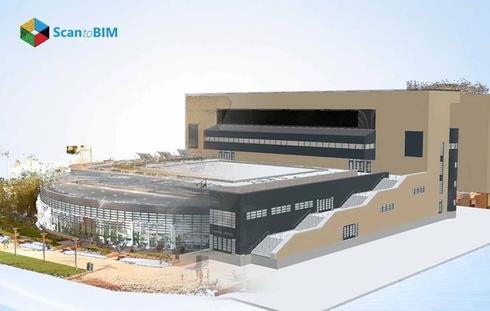
The workflow turns raw physical reality into structured digital intelligence. A scanner records geometry. A modeler converts that geometry into parametric components carrying real properties, room data, system identifiers, and asset metadata. The output behaves as a queryable database rather than a static picture.
Professional point cloud to BIM services deliver models that provide value through the full asset lifecycle. Design teams use them for retrofit planning. Construction teams use them for clash analysis. Facility teams use them as the geometric backbone for digital asset management BIM platforms.
The model becomes a single source of truth across teams. Each part holds tags pointing to maintenance systems, IoT feeds, and work orders. Fresh scans, site photos, and sensor updates keep the asset current across the years of operation that follow handover.
Role of 3D Laser Scanning in Existing Building Modeling
Laser scanning forms the foundation of every point cloud to BIM project. Terrestrial scanners emit millions of laser pulses each second. Each pulse returns a distance reading and an XYZ coordinate. The result becomes a rich point cloud capturing the physical world at millimeter accuracy.
Scan to BIM for existing buildings depends on careful equipment selection. Leica RTC360, FARO Focus, Trimble X7, and NavVis VLX cover most architectural and industrial use cases. Drone photogrammetry adds aerial coverage for roofs and façades. Handheld scanners reach tight mechanical rooms and access constrained spaces.
Laser scanning eliminates repeat site visits because the captured cloud holds every dimension the design team might ever need. Heritage buildings gain extra protection through touchless capture, since the laser pulse interacts optically with surfaces. Mobile mapping rigs document large campuses in a single walking pass. The technology compresses weeks of manual fieldwork into days of capture plus processing.
Laser scanning existing buildings also produces a permanent baseline. Future scans compare directly to this baseline, revealing structural drift, settlement, or unauthorized changes over time.
Benefits of Point Cloud to BIM for Facility Management
Facility teams gain long-term operational value from converted models. The geometric record gives maintenance staff accurate locations for every architectural, structural, and mechanical asset. Work orders link straight to specific model parts. Asset tags hold warranty data, service history, and replacement timing.
Point cloud to BIM for facilities feeds building lifecycle management from day one of ownership through eventual disposal. The model becomes the geometric anchor inside CAFM and CMMS systems. Equipment locations stay obvious to the team. Maintenance scheduling tightens up. Capital plans pull from verified geometry rather than from outdated floor plans.
Stanford University CIFE research shows BIM workflows cut unbudgeted change orders by up to 40% across studied building projects. Facility teams report parallel gains through faster information access. The same model handles emergency response planning, space allocation, energy audits, and sustainability tracking across the portfolio.
Applications in Renovation and Retrofit Projects
Renovation work gains directly from verified geometry. Architects test fresh layouts against actual conditions, rather than guessing from old drawings. Structural engineers read real load paths off the model. MEP designers route new systems through documented existing infrastructure with zero hand-waving.
As-built BIM models feed clash detection workflows during preconstruction. Coordinators pull the fresh design alongside the existing model inside Navisworks. Conflicts pop up fast. BIM Collaborate Pro gives cloud teams the same view. Field rework drops sharply because the clashes appear in the model first.
Energy retrofit work pulls the model into thermal envelope analysis, HVAC redesign, and insulation upgrade planning. Hospitals, schools, airports, and industrial plants gain similar value from accurate digital building documentation. Heritage adaptive reuse projects sit at the intersection: the workflow protects fragile elements alongside modern code compliance.
Industrial modernization also depends on accurate models. Plant operators use them for piping replacements, equipment swaps, and process line upgrades.
Digital Twin Integration for Existing Buildings
Digital twins extend BIM models into living operational systems. The geometric model holds the spatial framework. IoT sensors, AI analytics, and operational data layers add real-time intelligence. The mix gives you a virtual replica that tracks the physical asset moment to moment.
Scan to BIM for digital twin workflows, power HVAC monitoring, and occupancy analysis. Energy tracking and structural health alerts run off the same geometry. Smart building workflows lean on this foundation for sensor placement, alert routing, and dashboard design.
Predictive maintenance code reads live sensor data against past patterns to flag equipment risk early. Space tools overlay occupancy data onto the real geometry. Sustainability teams model energy scenarios based on the verified building shape.
Challenges in Converting Existing Buildings into BIM Models
The workflow carries real friction. Glass, polished steel, and water surfaces create scan gaps. Equipment occludes critical geometry. Outdoor weather affects scan quality. Tight rooms force creative capture through mirrors, drones, or robotic crawlers.
Massive datasets test the hardware. A single campus scan runs into terabytes of points. Workstations need fat memory pools and fast SSD storage to keep up. File handoffs from scanning software into Revit or IFC formats create friction of their own.
Heritage geometry takes serious manual effort. Curved walls, irregular columns, ornamental details, and weathered surfaces all resist automated extraction. Hidden utilities behind ceilings or floors force the team to combine destructive probes with the scan record. BIM experts and sharp QA reviewers stay on the hiring shortlist for this kind of work.
Case Study: 40,000 Sq. Ft. Residential Conversion in the USA
A US based residential client needed a verified digital record of a 40,000 sq ft duplex to support renovation planning and design exploration. Our team delivered a geometrically accurate model at 1/8-inch precision in just 14 days, using in-house AI tools for wall extraction and a proprietary QA layer with over 100 automated checks. Multiple interior and exterior design options were built directly on the verified geometry, with Enscape renderings giving the client clear visual confidence before any physical work began.
Accuracy and LOD Requirements for Existing Building BIM
Project scope drives accuracy targets. Standard architectural modeling reaches ±10 mm tolerance from terrestrial scans. Structural critical components hit ±3 mm with calibrated workflows. Anchor points from survey-grade controls tie the model to real-world coordinates.
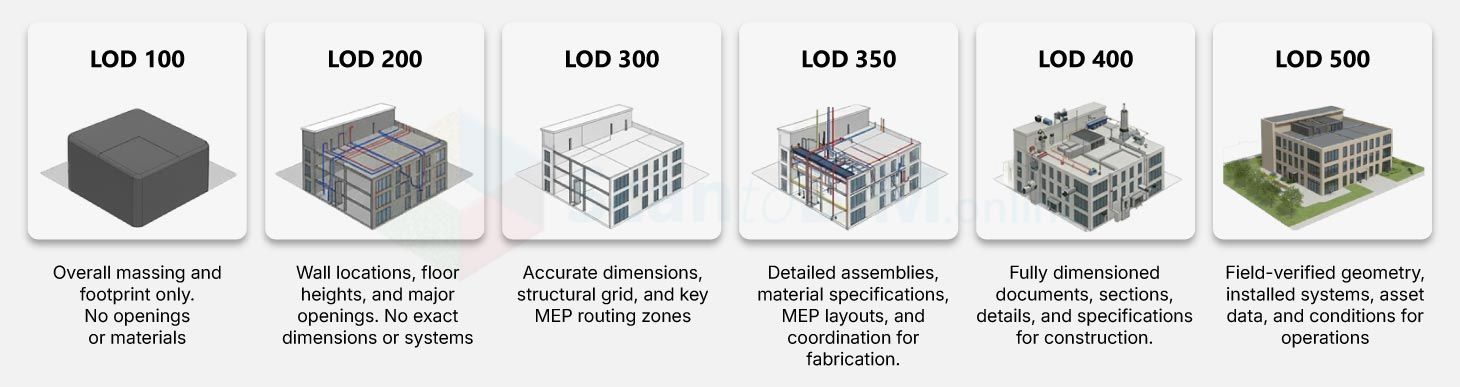
The level of Development sets the modeling target. Each tier carries a different job.
- LOD 100 through 200 covers concept planning and feasibility, where rough geometry gets the brief across
- LOD 300 hits the accuracy mark for design coordination and clash work
- LOD 350 layers extra interface detail between trades is helpful when multidisciplinary teams need to sync
- LOD 400 carries fabrication-grade detail, the kind prefab shops and complex installs demand
- LOD 500 verifies existing conditions in the field. Facility management programs and digital twin work both sit here
Pushing into higher tiers costs more, takes longer, and produces heavier files. Deviation checks against the original cloud confirm tolerance compliance. Quality teams overlay model parts against the cloud inside Navisworks or Revit to spot deviation zones.
Best Practices for Point Cloud to BIM Workflows
Successful projects start with a clear scope definition. The team locks down LOD targets, accuracy tolerances, deliverables, file formats, and downstream uses at the kickoff. Scan planning matters a lot. Station coverage, overlap percentages, target placement, and environmental conditions affect data quality at every stage. Registration accuracy comes back to careful field execution.
Preprocessing covers cloud registration, alignment, noise filtering, segmentation, and color balancing. The cleaned cloud loads faster inside Revit through RCP, RCS, E57, or LAS formats. Modelers run section boxes, clipping planes, and visibility filters to wrestle large datasets into manageable chunks. AI-assisted tools speed up wall, pipe, and structural extraction inside Autodesk Construction Cloud or ClearEdge3D EdgeWise.
QC pulls together deviation analysis, clash detection, and field validation. Naming rules, coordinate alignment, and structured family libraries are essential components of our project. These housekeeping habits keep the model usable for years to come. A paper in the journal Buildings shows deep learning extraction of walls and façades, trimming manual modeling hours sharply.
Choosing the Right Point Cloud to BIM Partner
Picking the right partner shapes project outcomes more than the software choice does. A seasoned provider shows real work across architectural, structural, MEP, industrial, and heritage modeling. Their track record holds up across building types and project scales. Ask for sample deliverables. Ask for past case studies. Ask for accuracy guarantees you can verify.
Strong QC sets serious providers apart from generic outsourcing shops. Templates for deviation reports, tolerance procedures, and revision protocols. The right partner shares all of it at kickoff. Complex renovation, retrofit, and adaptive reuse jobs are their specialty. Project managers respond fast. Schedules stay realistic. Deliverables land in the format you expected. Tech compatibility covers Revit, IFC, Navisworks, AutoCAD, BIM 360, and Autodesk Construction Cloud. Outsourcing the workflow lets internal design teams focus on creative and analytical work rather than production modeling. Costs drop because external teams operate at scale across many active projects.
Conclusion
Point Cloud to BIM turns physical buildings into intelligent digital assets that deliver value across decades of operation. Laser scanning captures real conditions with millimeter accuracy. Modelers convert that geometry into structured BIM components carrying full asset intelligence. The output supports renovation, retrofit, facility management, heritage preservation, and digital twin programs through one verified source of truth. Owners gain better decisions, contractors gain fewer surprises, and facility teams gain faster access to building information across the asset lifecycle.